Date: Tuesday, February 13, 2024
Work Undertaken Summary
- Document Logbook choices
- Setup Logbook
- Setup Timesheet + reporting
- Setup Quartz (publish the notes)
- Fix DataView on publish
Problems encountered and how you overcame them
Had to learn how DataView works. Especially the edges of the query language to enable queries around the complex object for the time property. Was able to get it to work using the examples provided by Dataview (blacksmithgu.github.io) seburbandev/obsidian-dataview-cheatsheet: This cheatsheet provides a handy reference guide for writing powerful queries using the dataview plugin in Obsidian. (github.com)
Publishing straight using quartz has the problem that the dataview plugin isn’t executed during publish. So what is published is the raw query rather than the results of the query. Which is not useful for sharing with my tutor.
Thankfully this week a new tool called quartz-syncer was released that allows the queries to be run and baked in prior to publishing.
Time Spent
- task: ”Log Book” time: 6 hours progress: 80
- task: ”Blog Setup” time: 3 hours progress: 100
- task: ”Tutorials” time: 3 hours progress: 20
- task: ”Retrieve Database” time: 1.5 hours progress: 100
Questions for Tutor
N/A
Next work planned
TMA01
Raw Notes
Log book
Talk about using obsidian as my log, and how I’ve set things out. With dates in the file names (find what the name of that note taking method is) and explain the reasoning:
- Local notes
- markdown files - very portable.
- Easy mix of media (code, notes, emails, )
- spellcheck
- free for academic use
- Easy cross linking of notes / ideas
- good search
- easy share with tutor Hosting (jzhao.xyz)
Obsidian Setup
My Obsidian Daily Note Template | Dann Berg: blog, newsletter, shop, and more How to Use YAML Front Matter in Obsidian (2024) - WunderTech Dataview (blacksmithgu.github.io) seburbandev/obsidian-dataview-cheatsheet: This cheatsheet provides a handy reference guide for writing powerful queries using the dataview plugin in Obsidian. (github.com)
#choice Using DataView so that as much as possible is kept within the logbook. A singular source of truth. Makes it easier to match up time spent with the activities. Easier to communicate with tutor. Less context switching.
Obsidian template
Template includes: Date - For easy tracking Time - To show time on the weekly log AND in aggregate
Communication requirement
Talk about emailing every 2 weeks. High level what did I achieve and what the next steps are.
TODO make a template.
Obsidian Publish
Obsidian publish doesn’t natively support
Support for Dataview JS Snippets · Issue #102 · jackyzha0/quartz (github.com)
#choice I am using cloudflare pages as its free and I already have a domain setup with cloudflare.
#choice I am using quartz as its free and self hostable, doesn’t require obsidians paid subscription.
Publish Problems
Publishing straight using quartz has the problem that the dataview plugin isn’t executed during publish. So what is published is the raw query rather than the results of the query. Which is not useful for sharing with my tutor.
Thankfully only this week github user saberzero1 published a tool to allow the queries to be run and “baked” into the website.
saberzero1/quartz-syncer: Markdown publisher for Quartz with Dataview support. (github.com)
What is the artefact
The core artefact is the specification. Which due to IP reasons cannot be shared in its entirety. The artefact is:
- Samples of the redacted specification
- The code required to create the specification
- The code required to analyse the specifications
- The tables/graphs to explain the analysis
- The analysis discussion
Importing the data
Exported a bacpac from sql azure. Ran into a problem with importing it locally as my sql server instance didn’t have contained database authentication enabled (which we use for replicating the production db / fail overs.)
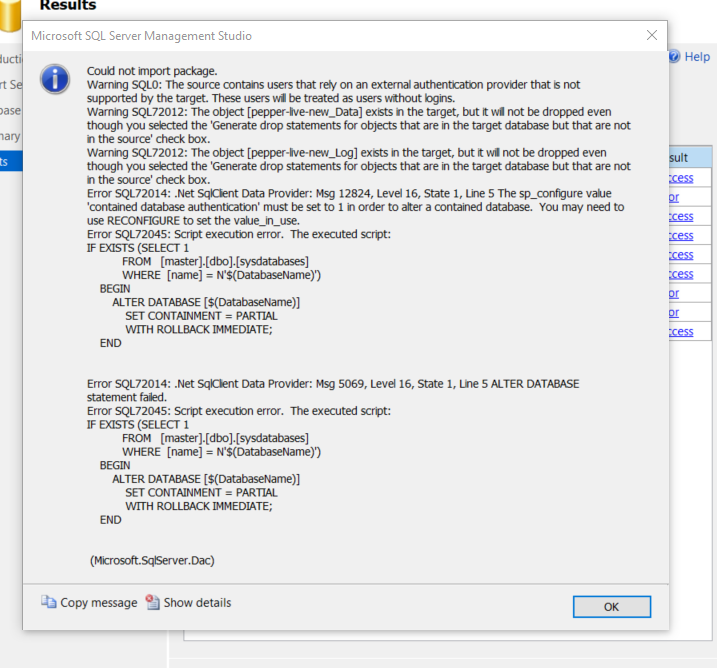
Enable SQL Server Contained Database Authentication (kodyaz.com)
fixed by
sp_configure 'contained database authentication', 1
reconfigure
Configuration option 'contained database authentication' changed from 0 to 1. Run the RECONFIGURE statement to install.
Completion time: 2024-02-18T18:45:49.8038654+00:00
Bibliography
Using Dataview on Obsidian Publish · joschua.io
Transclude of 2024-02-11-TMA01-Tutorial
Transclude of 2024-02-13-Welcome-Tutorial